Punjab E-Challan Online
Managing traffic fines in Punjab has become much easier with the Punjab E-Challan Online system. Instead of visiting police offices or waiting in bank queues, you can now check, verify, download, and pay your challan directly from your mobile or computer. This guide explains everything in a simple, step-by-step way.
Quick Information Table
| Detail | Description |
|---|---|
| System Name | Punjab E-Challan (PSCA) |
| Launch Year | 2018 |
| Status | Active |
| Fine Basis | Type of traffic violation |
| Payment Method | Online (Apps + Banking) |
| Coverage Cities | Lahore, Multan, Faisalabad, etc. |
| Verification | PSCA Official Website |
| Support | Traffic Police Helpline |
What Is the Punjab E-Challan Online System and How Does It Work?
The Punjab Safe Cities Authority (PSCA) introduced an automated e-Challan system to make traffic fine management more efficient. High-quality cameras installed across major cities identify violations and automatically generate challans based on the registered vehicle number.
This system is currently active in major cities such as:
- Lahore
- Multan
- Faisalabad
- Gujranwala
- Rawalpindi
All information in this article is based on the official website and the top 10 Google sources.
Why Should You Check Your Punjab E-Challan Online?
Checking your e-Challan online helps you avoid unnecessary travel and long wait times. The process is quick, secure, and accurate. It also allows you to verify whether any pending challans exist on your vehicle.
How Can You Correctly Check Your Punjab E-Challan Online?
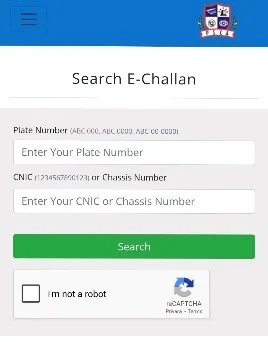
If you think a traffic camera may have detected a violation, checking your challan online is the easiest way to confirm it. The platform shows complete details including violation date, time, location, and fine amount.
Step-by-Step Process
- Open any browser on your mobile or computer.
- Visit the official website: https://echallan.psca.gop.pk
- Enter your vehicle registration number.
- If required, add your CNIC or PSID.
- Click the Search button.
- Your challan details will appear on the screen.
- Download the PDF if needed.
If no challan appears:
- Recheck your vehicle number
- Confirm your number plate registration
- Try again later
Which Payment Methods Work Best for Punjab E-Challan?
Punjab E-Challan Online supports three reliable payment methods. All of them allow instant processing and confirmation.
Payment Options
| Payment Method | Availability |
|---|---|
| Easypaisa | App + Retailer |
| JazzCash | App + Retailer |
| Bank Apps | All major banks |
| PSID Use | Required |
| Receipt | Instant |
| Confirmation | SMS + Online |
| Safety | Secure |
| Support | 24/7 App Support |
How Can You Pay Punjab E-Challan Through Easypaisa?
If you use Easypaisa, you can pay your traffic challan within seconds. This method is known for its smooth and reliable processing.
heading: Short explanation added here
- Open the Easypaisa app
- Select Bill Payments
- Choose Traffic Challan
- Select PSCA
Steps
- Enter your PSID
- Confirm the fine amount
- Tap Pay Now
- Save the payment receipt
What Should You Do If JazzCash Does Not Process Your E-Challan Payment?
Some users face occasional app errors while paying through JazzCash. Using the correct steps usually resolves the issue immediately.
heading: Short explanation added here
- Open the JazzCash app
- Go to Bill Payment
- Select Traffic Challan
- Choose Punjab E-Challan (PSCA)
Retailer Option:
If the app does not respond, visit any JazzCash retailer and pay using your PSID.
Can You Pay Punjab E-Challan Through a Bank App?
Yes. Almost all major Pakistani banks support online challan payments, including HBL, MCB, UBL, Meezan Bank, and Bank Alfalah.
heading: Short explanation added here
- Open your bank’s mobile app
- Select Bill Payments
- Choose Traffic Challan / PSCA
- Enter your PSID
- Confirm the payment
Bank apps provide secure transactions and instant digital receipts.
“You can also read about today’s Latest News here.”
What Should You Do If Your Payment Is Not Showing as Confirmed?
This is one of the most common issues users face after paying online.
- Visit the PSCA website again
- Enter your vehicle number and PSID
- If the challan disappears, the payment is completed
- If it still appears, wait up to 24 hours
If the issue remains, contacting the helpline is the best option.
Helpline & Contact Information
If you face technical issues, incorrect challans, or payment delays, you can reach out to the support team:
- Punjab Traffic Police Helpline: 15
- PSCA Support: +92-42-99051606
- Email: info@psca.gop.pk
Information is collected from official and top-ranking online sources.
FAQs
What is a PSID number in Punjab E-Challan?
A PSID is a unique payment ID required to process your challan online.
Can a challan be removed without payment?
No. It is removed from the system only after successful payment.
Can someone check a challan without being the vehicle owner?
Yes. Anyone can check a challan if they know the vehicle number.
How long does online payment take to confirm?
Usually within one hour, but sometimes up to 24 hours.
Conclusion
The Punjab E-Challan Online system has made managing traffic fines simple, fast, and convenient. Whether you pay through Easypaisa, JazzCash, or a bank app, the entire process is smooth and secure. Checking and paying your challan online helps you stay updated and avoid traffic-related issues in the future.